> ## Documentation Index
> Fetch the complete documentation index at: https://wiki.another-horizon.eu/llms.txt
> Use this file to discover all available pages before exploring further.
# Google Analytics 4
> Track visitor behavior and engagement with Google Analytics.
You will need to generate a new GA4 property to use with Mintlify. The data collected will go into the same project as your other Google Analytics data.
If you are using the old version of Google Analytics, Universal Analytics, you will still be able to generate a GA4 property. GA4 data is slightly different from UA data but still gets collected in the same project.
## How to Connect GA4 to Mintlify
### Create a Web Stream
You will need to create a web stream to get the Measurement ID to put into Mintlify.
Click the cog at the bottom left of the Google Analytics screen. Then click on Data Streams.
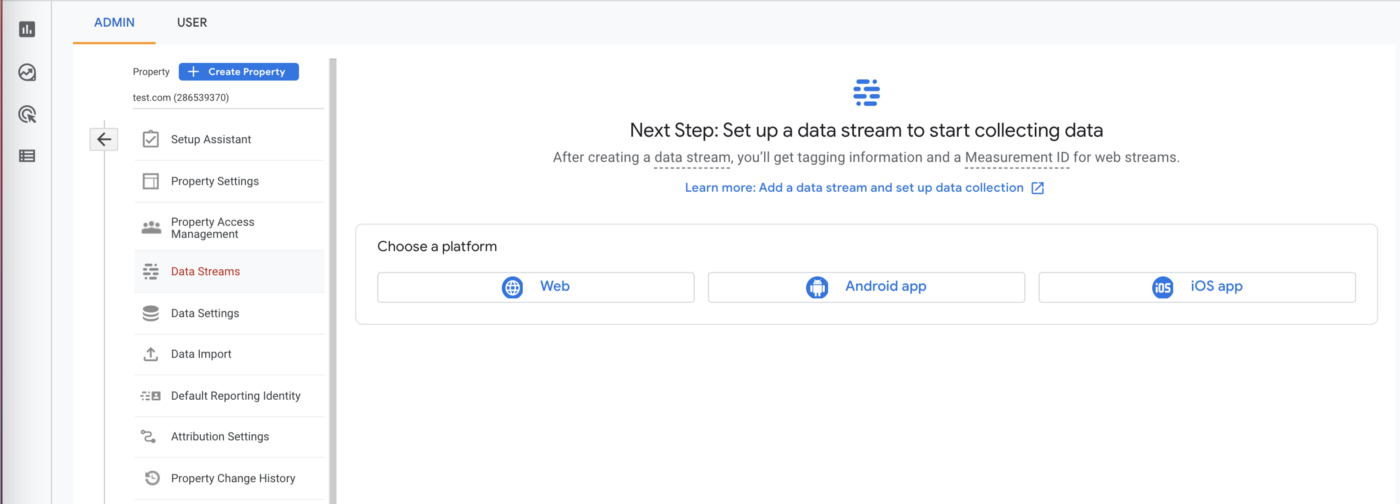 Create a Web Stream and put the URL of your Mintlify docs site as the stream URL.
Your Measurement ID looks like `G-XXXXXXX` and will show up under Stream Details immediately after you create the Web Stream.
### Put Measurement ID in docs.json
Add your Measurement ID to your `docs.json` file like so:
```json docs.json theme={null}
"integrations": {
"ga4": {
"measurementId": "G-XXXXXXX"
}
}
```
### Wait
Google Analytics takes two to three days to show your data.
You can use the [Google Analytics Debugger](https://chrome.google.com/webstore/detail/google-analytics-debugger/jnkmfdileelhofjcijamephohjechhna?hl=en) to check analytics are enabled correctly. The extension will log to your browser's console every time GA4 makes a request.
Preview links have analytics turned off.
Create a Web Stream and put the URL of your Mintlify docs site as the stream URL.
Your Measurement ID looks like `G-XXXXXXX` and will show up under Stream Details immediately after you create the Web Stream.
### Put Measurement ID in docs.json
Add your Measurement ID to your `docs.json` file like so:
```json docs.json theme={null}
"integrations": {
"ga4": {
"measurementId": "G-XXXXXXX"
}
}
```
### Wait
Google Analytics takes two to three days to show your data.
You can use the [Google Analytics Debugger](https://chrome.google.com/webstore/detail/google-analytics-debugger/jnkmfdileelhofjcijamephohjechhna?hl=en) to check analytics are enabled correctly. The extension will log to your browser's console every time GA4 makes a request.
Preview links have analytics turned off.