> ## Documentation Index
> Fetch the complete documentation index at: https://wiki.another-horizon.eu/llms.txt
> Use this file to discover all available pages before exploring further.
# Playground
> Let developers test API endpoints directly in your documentation.
## Overview
The API playground is an interactive environment that lets users test and explore your API endpoints. Developers can craft API requests, submit them, and view responses without leaving your documentation.
See [Trigger an update](/api/update/trigger) for an example of the API playground in action.
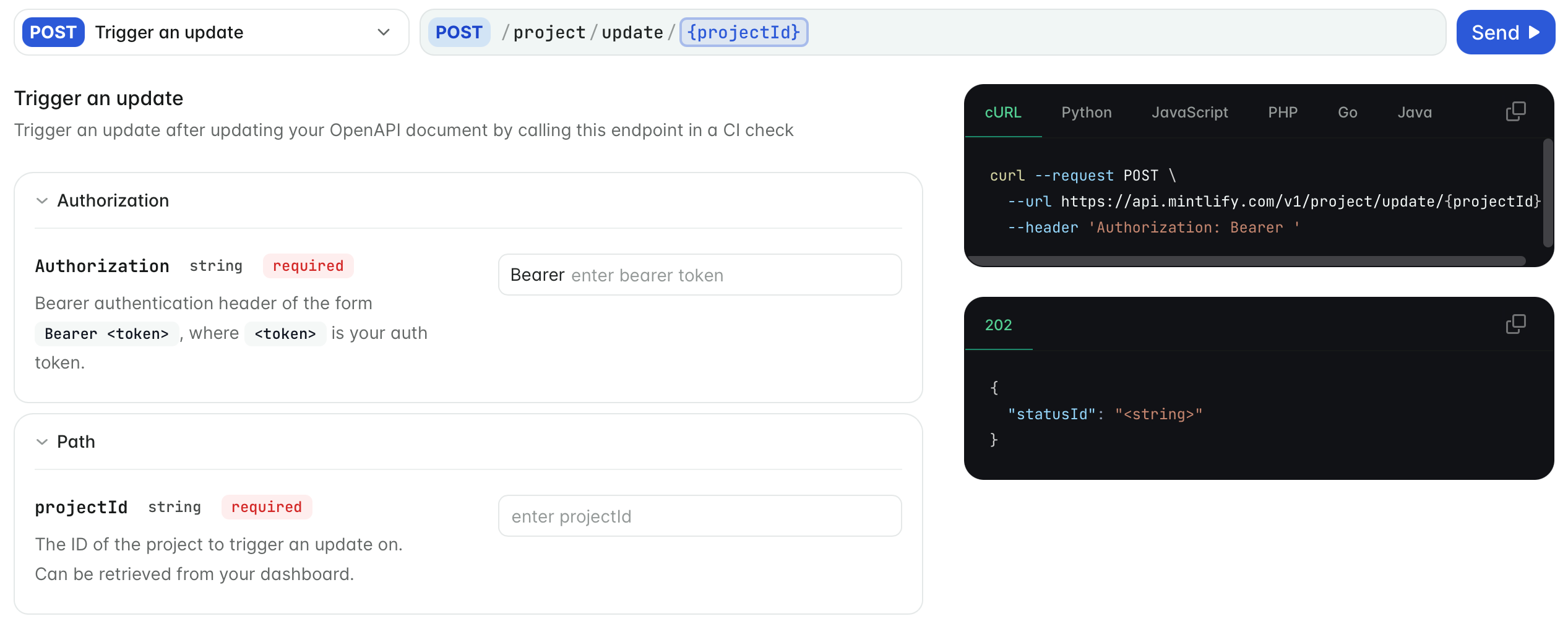
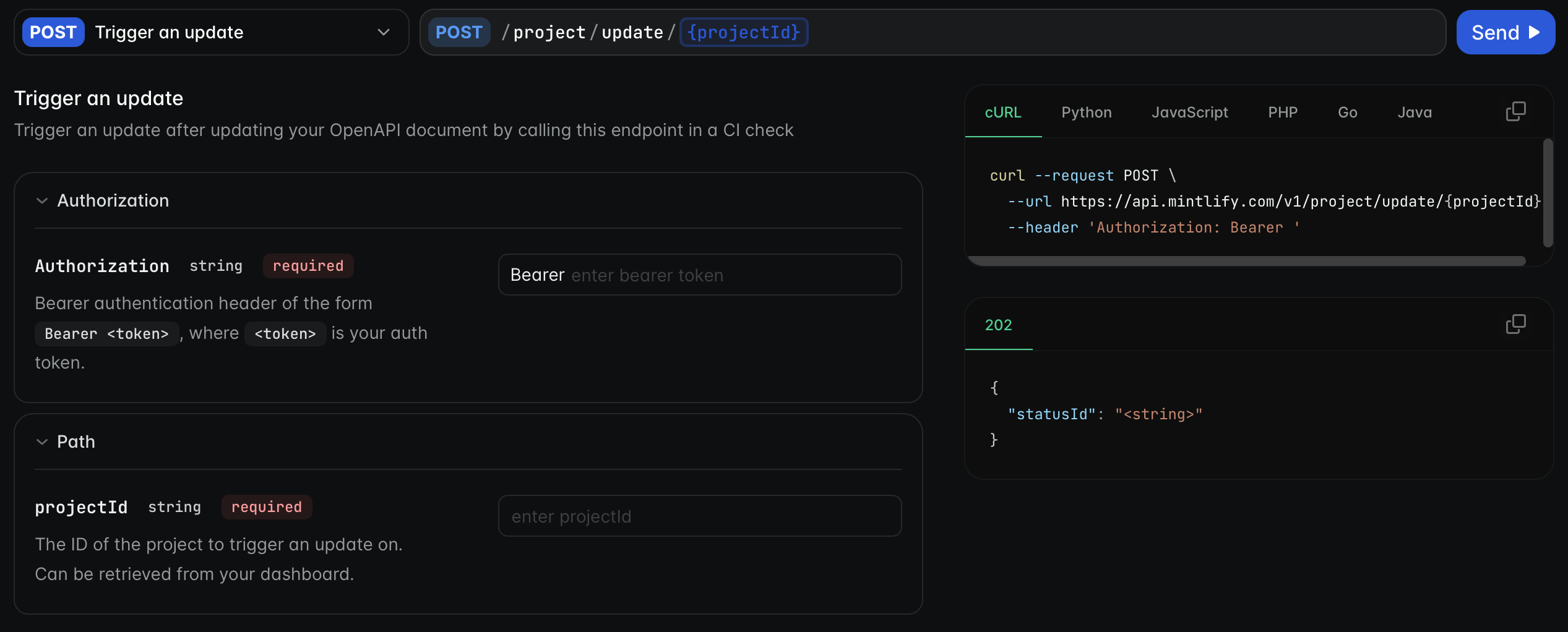 The playground generates interactive pages for your endpoints based on your OpenAPI specification or AsyncAPI schema. If you modify your API, the playground automatically updates the relevant pages.
We recommend generating your API playground from an OpenAPI specification. However, you can manually create API reference pages after defining a base URL and authentication method in your `docs.json`.
## Get started
Validate your OpenAPI specification file using the [Swagger Editor](https://editor.swagger.io/) or [Mint CLI](https://www.npmjs.com/package/mint) command `mint openapi-check `.
```bash {3} theme={null}
/your-project
|- docs.json
|- openapi.json
```
Update your `docs.json` to reference your OpenAPI specification.
**To automatically generate pages for all endpoints in your OpenAPI specification**, add an `openapi` property to any navigation element.
This example generates a page for each endpoint specified in `openapi.json` and organizes the pages in the "API reference" group.
```json Generate all endpoint pages theme={null}
"navigation": {
"groups": [
{
"group": "API reference",
"openapi": "openapi.json"
}
]
}
```
**To generate pages for only specific endpoints**, list the endpoints in the `pages` property of the navigation element.
This example generates pages for only the `GET /users` and `POST /users` endpoints. To generate other endpoint pages, add additional endpoints to the `pages` array.
```json Generate specific endpoint pages theme={null}
"navigation": {
"groups": [
{
"group": "API reference",
"openapi": "openapi.json",
"pages": [
"GET /users",
"POST /users"
]
}
]
}
```
## Customize your playground
Customize your API playground by defining the following properties in your `docs.json`.
Configurations for the API playground.
The display mode of the API playground.
* `"interactive"`: Display the interactive playground.
* `"simple"`: Display a copyable endpoint with no playground.
* `"none"`: Display nothing.
Defaults to `interactive`.
Whether to pass API requests through a proxy server. Defaults to `true`.
Configurations for the autogenerated API examples.
Example languages for the autogenerated API snippets.
Languages display in the order specified.
Whether to show optional parameters in API examples. Defaults to `all`.
Whether to prefill the API playground with data from schema examples. When enabled, the playground automatically populates request fields with example values from your OpenAPI specification. Defaults to `false`.
### Example configuration
This example configures the API playground to be interactive with example code snippets for cURL, Python, and JavaScript. Only required parameters are shown in the code snippets, and the playground prefills the request body with example values.
```json theme={null}
{
"api": {
"playground": {
"display": "interactive"
},
"examples": {
"languages": ["curl", "python", "javascript"],
"defaults": "required",
"prefill": true
}
}
}
```
### Custom endpoint pages
When you need more control over your API documentation, use the `x-mint` extension in your OpenAPI specification or create individual MDX pages for your endpoints.
Both options allow you to:
* Customize page metadata
* Add additional content like examples
* Control playground behavior per page
The `x-mint` extension is recommended so that all of your API documentation is automatically generated from your OpenAPI specification and maintained in one file.
Individual MDX pages are recommended for small APIs or when you want to experiment with changes on a per-page basis.
## Further reading
* [OpenAPI setup](/api-playground/openapi-setup) for more information on creating your OpenAPI document.
* [x-mint extension](/api-playground/openapi-setup#x-mint-extension) for more information on customizing your endpoint pages.
* [MDX setup](/api-playground/mdx-setup) for more information on manually creating individual API reference pages.
* [AsyncAPI setup](/api-playground/asyncapi-setup) for more information on creating your AsyncAPI schema to generate WebSocket reference pages.
The playground generates interactive pages for your endpoints based on your OpenAPI specification or AsyncAPI schema. If you modify your API, the playground automatically updates the relevant pages.
We recommend generating your API playground from an OpenAPI specification. However, you can manually create API reference pages after defining a base URL and authentication method in your `docs.json`.
## Get started
Validate your OpenAPI specification file using the [Swagger Editor](https://editor.swagger.io/) or [Mint CLI](https://www.npmjs.com/package/mint) command `mint openapi-check `.
```bash {3} theme={null}
/your-project
|- docs.json
|- openapi.json
```
Update your `docs.json` to reference your OpenAPI specification.
**To automatically generate pages for all endpoints in your OpenAPI specification**, add an `openapi` property to any navigation element.
This example generates a page for each endpoint specified in `openapi.json` and organizes the pages in the "API reference" group.
```json Generate all endpoint pages theme={null}
"navigation": {
"groups": [
{
"group": "API reference",
"openapi": "openapi.json"
}
]
}
```
**To generate pages for only specific endpoints**, list the endpoints in the `pages` property of the navigation element.
This example generates pages for only the `GET /users` and `POST /users` endpoints. To generate other endpoint pages, add additional endpoints to the `pages` array.
```json Generate specific endpoint pages theme={null}
"navigation": {
"groups": [
{
"group": "API reference",
"openapi": "openapi.json",
"pages": [
"GET /users",
"POST /users"
]
}
]
}
```
## Customize your playground
Customize your API playground by defining the following properties in your `docs.json`.
Configurations for the API playground.
The display mode of the API playground.
* `"interactive"`: Display the interactive playground.
* `"simple"`: Display a copyable endpoint with no playground.
* `"none"`: Display nothing.
Defaults to `interactive`.
Whether to pass API requests through a proxy server. Defaults to `true`.
Configurations for the autogenerated API examples.
Example languages for the autogenerated API snippets.
Languages display in the order specified.
Whether to show optional parameters in API examples. Defaults to `all`.
Whether to prefill the API playground with data from schema examples. When enabled, the playground automatically populates request fields with example values from your OpenAPI specification. Defaults to `false`.
### Example configuration
This example configures the API playground to be interactive with example code snippets for cURL, Python, and JavaScript. Only required parameters are shown in the code snippets, and the playground prefills the request body with example values.
```json theme={null}
{
"api": {
"playground": {
"display": "interactive"
},
"examples": {
"languages": ["curl", "python", "javascript"],
"defaults": "required",
"prefill": true
}
}
}
```
### Custom endpoint pages
When you need more control over your API documentation, use the `x-mint` extension in your OpenAPI specification or create individual MDX pages for your endpoints.
Both options allow you to:
* Customize page metadata
* Add additional content like examples
* Control playground behavior per page
The `x-mint` extension is recommended so that all of your API documentation is automatically generated from your OpenAPI specification and maintained in one file.
Individual MDX pages are recommended for small APIs or when you want to experiment with changes on a per-page basis.
## Further reading
* [OpenAPI setup](/api-playground/openapi-setup) for more information on creating your OpenAPI document.
* [x-mint extension](/api-playground/openapi-setup#x-mint-extension) for more information on customizing your endpoint pages.
* [MDX setup](/api-playground/mdx-setup) for more information on manually creating individual API reference pages.
* [AsyncAPI setup](/api-playground/asyncapi-setup) for more information on creating your AsyncAPI schema to generate WebSocket reference pages.